
Docs2 min readDecember 24, 2025
Getting Started
Set up your theme, configure core storefront basics, and launch with confidence.
Welcome! This section walks you from install → configure → launch with practical steps and common pitfalls.
What you'll do
- Install and publish the theme safely (with a rollback plan)
- Configure global theme settings and style presets
- Add brand assets (logo, colours, typography, imagery)
- Set up product essentials (variants, swatches, size charts, media)
- Configure collections, filtering, and storefront navigation
- Run a quick pre-launch checklist to avoid day-one issues
Recommended order
- Install & publish your theme
- Theme editor essentials
- Choose a style preset and make it yours
- Image & video guidelines
- Build custom pages with sections
- Product setup: variants, swatches, size charts
- Product media: images, video, 3D
- Collections & filtering
- Labels & badges: new, coming soon, sale
- Launch checklist
- Troubleshooting & support
If you're migrating an existing store
If you already have products, collections, and menus, focus first on:
- Theme install + preview
- Header/footer navigation
- Collection templates + filtering
- Product page template + media
- Cart + key conversions
Glossary (quick)
- Theme editor: Shopify's visual editor where you add sections/blocks and set theme settings.
- Template: A layout assigned to a resource (product, collection, page) that controls which sections appear.
- Section: A modular content block you can add/reorder (hero, gallery, testimonials, etc.).
- Metafield: Structured data you attach to products/collections/pages to power richer content.
Keep a second copy of your currently-live theme published until you're fully ready to switch.
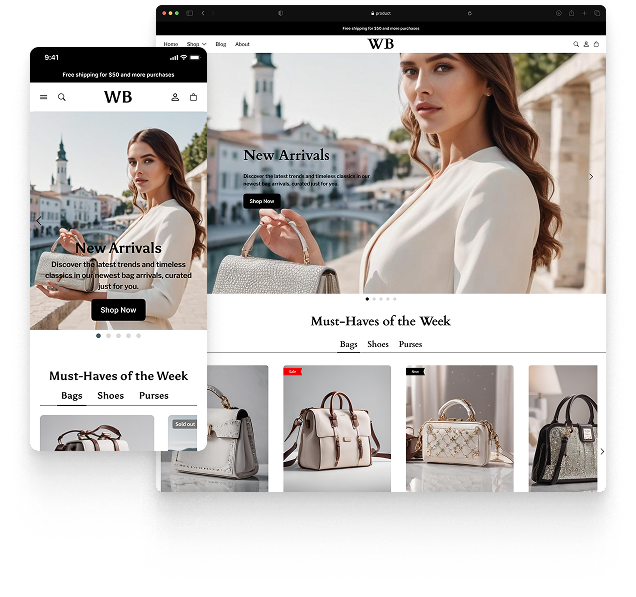
Featured theme: Fennec
Fast, responsive, SEO-ready theme built for conversion.
- Online Store 2.0 sections
- Performance-first layout
- Accessible, SEO-ready foundation
